Hotel Early Check-In: A Workflow for Requests and Approvals


Early Arrival
Requests, readiness, and approval
"Can we arrive at noon?"
The front desk checks with housekeeping, waits for an answer, then gets back to the guest. If there's a fee, someone needs to explain that too.
An early-check-in workflow can pass the request to the right team and send the guest an update. Housekeeping still decides whether the room will be ready.
Here's how to set up that process, including what to do when early arrival isn't possible.
Set the check-in policy and fee
Specify the normal check-in time, how early guests can request to arrive, any fee, and who approves the request.
If approval is required, say so before the guest submits a request or pays. Explain when any fee is charged and what happens if the property cannot accommodate the requested time.
Use the same policy in the portal and in the information your AI agent uses to answer questions. Guests should hear the same answer wherever they ask.
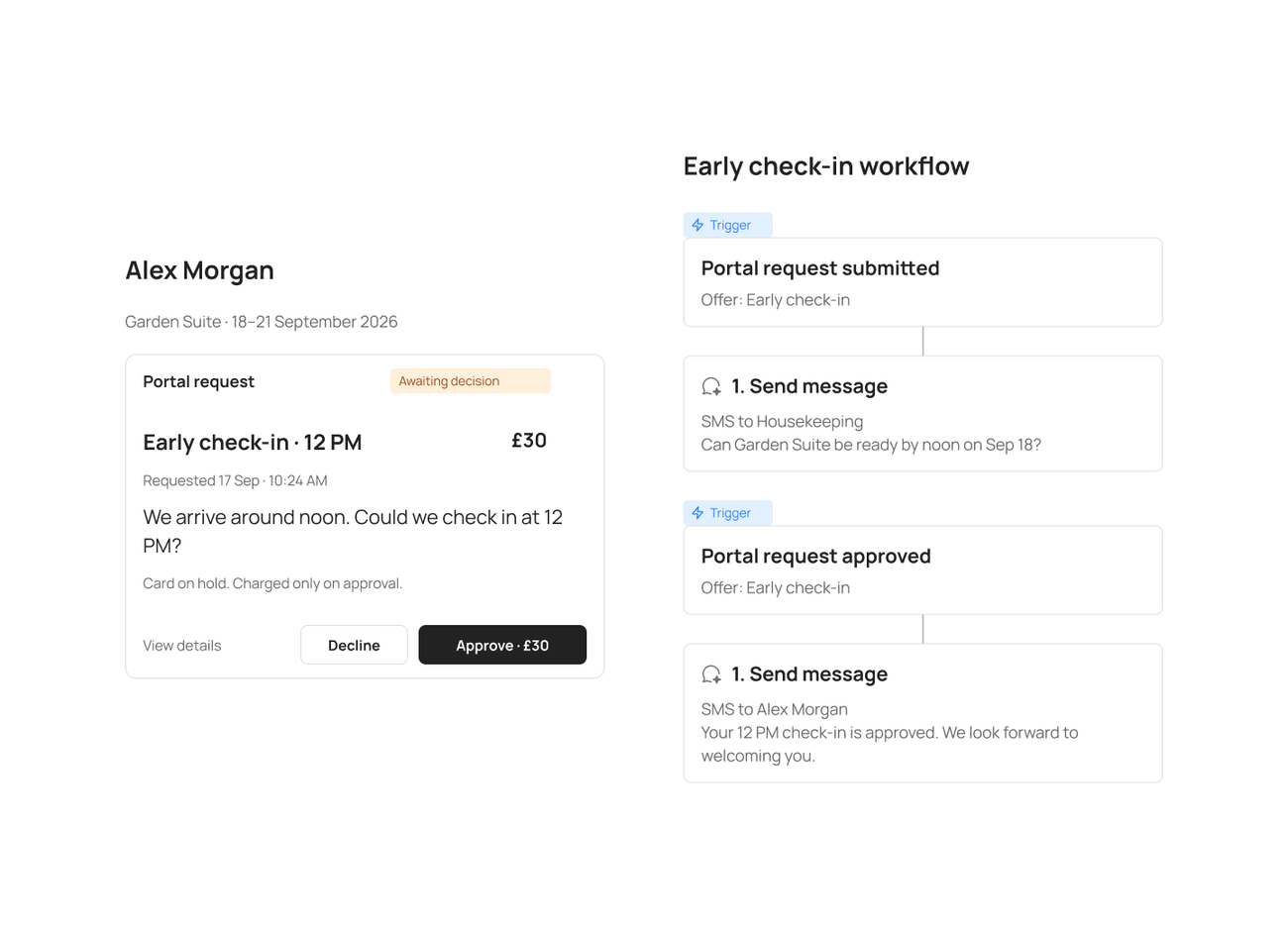
Illustrative configured workflow. The property sets the fee, availability rules, recipients, and approval requirements.
Collect the request in the portal
A guest can ask about early arrival in chat, then review the details and submit a request through their portal. They don't need to download an app.
In Conduit, portal requests appear alongside the guest's conversation in the inbox. Staff can see what the guest has already asked instead of starting the conversation again.
Include the arrival date, requested time, and reservation in the request. For returning guests, check that it is linked to the upcoming stay.
Ask housekeeping before confirming
Set up the workflow around the team responsible for preparing the room:
- Receive the request. Record the requested arrival time and reservation.
- Ask housekeeping. Send the request to the person who can check whether the room will be ready.
- Approve or decline. Have housekeeping or the designated approver make the decision.
- Handle any fee. Follow the property's payment setup and the terms shown to the guest.
- Update the guest. Confirm the approved arrival time or explain that early check-in isn't available.
Configure the notification and payment steps for the systems your property uses. A notification tells housekeeping that a request needs attention; it does not confirm that the room is ready.
If rooms need an inspection after cleaning, include that in the approval decision.
Handle delays and declined requests
If the room won't be ready, tell the guest when they can check in. Offer luggage storage or somewhere to wait if your property provides it.
If a fee has already been collected, follow the refund terms you showed the guest.
Choose a backup approver for requests that arrive while the usual contact is off shift. Set a time limit for unanswered requests and decide who should be notified next.
Make the guest's status clear
A guest should be able to tell whether their request is pending, approved, or declined. For example:
- Pending: "We've received your request to arrive at noon. Early check-in is not confirmed yet."
- Approved: "Your early check-in is confirmed for noon."
- Declined: "We can't offer noon check-in for your stay. Your standard check-in time still applies."
Send the confirmation only after approval and any required payment steps are complete.
You can use the same workflow for paid or complimentary early check-in. Follow your property's policy.
Test the workflow
Before going live, test a ready room, a delayed clean, an unavailable approver, and a guest who changes their arrival time.
Check that each request reaches the right person, the guest receives the correct update, and the outcome is visible in the inbox for the next shift.
Once it's running, track how long guests wait for a decision and how often staff still need to chase an answer. Check whether approved early arrivals actually have a room ready at the promised time.
Already using Portals? Open your workspace.
Not set up yet? Book a demo.

Stay in the loop
Get the latest on AI automation, product updates, and customer stories.

